Back
All Tools

Remove Image Background

100% Automatically and Free

Upload Image

or drop a file here (PNG, JPG, WebP)

AI Neural Matting Engine

Instant AI Passport Photo Background Changer

Isolate hair strands, erase distracting backgrounds, and replace them with official plain white or light sky-blue in seconds.

WebAssembly AI 100% Client-Side
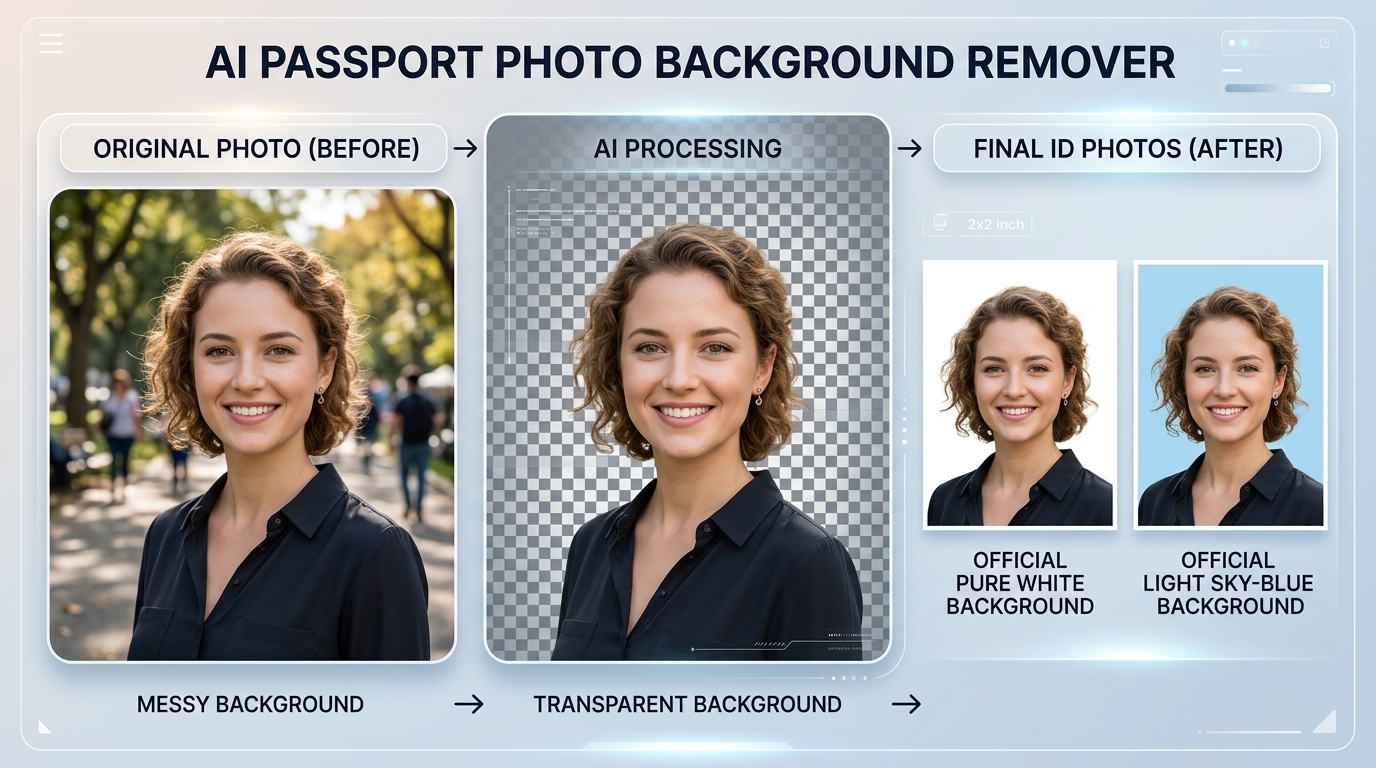
AI Passport Photo Background Remover Showcase showing Original, Transparent, White, and Sky Blue results
Zero Halo Effect: Crisp hair strand boundary extraction Full HD

Why Official Portals Require Specific Backgrounds

Government recruitment software uses automated facial biometric recognition. Cluttered backgrounds, outdoor greenery, shadows, or dark walls interfere with face detection algorithms, resulting in form rejection. Converting your backdrop to pure white or light sky-blue ensures 100% portal acceptance.

Deep Learning Hair Matting

Intelligently separates individual flyaway hairs and complex silhouettes without ugly jagged edges.

Instant Palette Replacement

Switch between Plain White, Sky Blue, Navy Blue, or Transparent PNG with a single click.

1. Plain White Background

Mandatory For: SSC (CGL, CHSL, GD, MTS), UPSC, NTA (NEET/JEE), Indian Passport & Overseas Visas. The background must be pure, clean, and free of shadows or patterns.

2. Light Sky Blue Background

Mandatory For: Rajasthan SSO ID recruitment, Rajasthan Police Constable/SI, REET, RPSC, and state exam portals. Provides high contrast and sharp portrait edges.

3. Transparent PNG Background

Best For: Resumes, CVs, biodata, employee ID cards, poster design, and social media profiles. Portrait is extracted cleanly with transparency preserved.

Official Examination & ID Photo Backdrop Requirements

Check the mandatory background requirements before submitting your online form.

Exam / Authority Required Backdrop Color Facial Coverage Common Rejection Reasons
SSC (CGL, CHSL, GD, MTS) Plain White or Light Gray 70% – 80% face coverage Outdoor trees, shadows behind head, caps, dark glasses
UPSC (Civil Services, NDA, CDS) Plain White Clear frontal view with both ears visible Uneven wall colors, selfies, low lighting
Rajasthan SSO / Police / REET / RPSC Light Sky-Blue or White 3.5 × 4.5 cm passport ratio Dark blue/red backgrounds, blurry mobile camera shots
Passport & Overseas Visa Pure White (Strict) 75% – 80% face height Off-white/yellowish tint, shadows, smiling with open teeth

How to Remove Photo Background in 4 Easy Steps:

  1. Click on the 'Upload Image' area above or drag and drop your photo (PNG, JPG, or WebP).
  2. The intelligent AI engine automatically detects hair strands and portrait contours, isolating the subject in seconds.
  3. Choose your desired backdrop from the color palette: Plain White, Sky Blue, or Transparent.
  4. For government and job application forms, select 🇮🇳 3.5x4.5cm to crop to official passport dimensions and click 'Download (HD)'.

Frequently Asked Questions (Background Removal FAQs)

1. What photo background color is officially required for government exams (SSC, Police, REET)?

Official guidelines from major recruitment authorities (such as SSC, UPSC, NTA, and Rajasthan SSO) require passport photos to have a plain white or light sky-blue background. Photos with dark, textured, natural, or cluttered backgrounds are routinely rejected by automated application scanners.

2. Does removing the background reduce image resolution or clarity?

Not at all. eMitraTool retains full source resolution while performing high-definition boundary smoothing and hair detailing. You can download the resulting image in crisp Full HD quality.

3. Is my photo uploaded or saved on any remote database?

No. Your privacy is 100% protected. Images are processed strictly inside your browser using client-side AI and are never permanently stored, logged, or uploaded to any remote server.

4. Can I crop the photo into standard passport size (3.5 × 4.5 cm) after removing the background?

Yes! Right after changing the background, select the standard 3.5×4.5 cm passport ratio, adjust face framing, and click 'Print Sheet (4x6)' to generate a printable 8-photo sheet ready for physical printing.

5. What are the advantages of a Transparent PNG background?

A transparent PNG allows you to overlay your cutout onto any banner, presentation, official letterhead, resume, or custom graphic without messy white square borders.