100% Client-Side Fast PDF & Photo Joiner

Merge PDF & Photos Online

Combine multiple PDFs and image files into a single unified document. Preserves 100% exact original Width × Height dimensions with drag-and-drop reordering.

Page-by-Page Control

Reorder, delete or rotate individual pages from different documents with instant visual preview.

Exact Original W×H Size

Every PDF page and image is preserved in its 100% authentic original Width × Height dimension.

100% Private & Free

All PDF merging happens strictly inside your browser. No files are uploaded to any server.
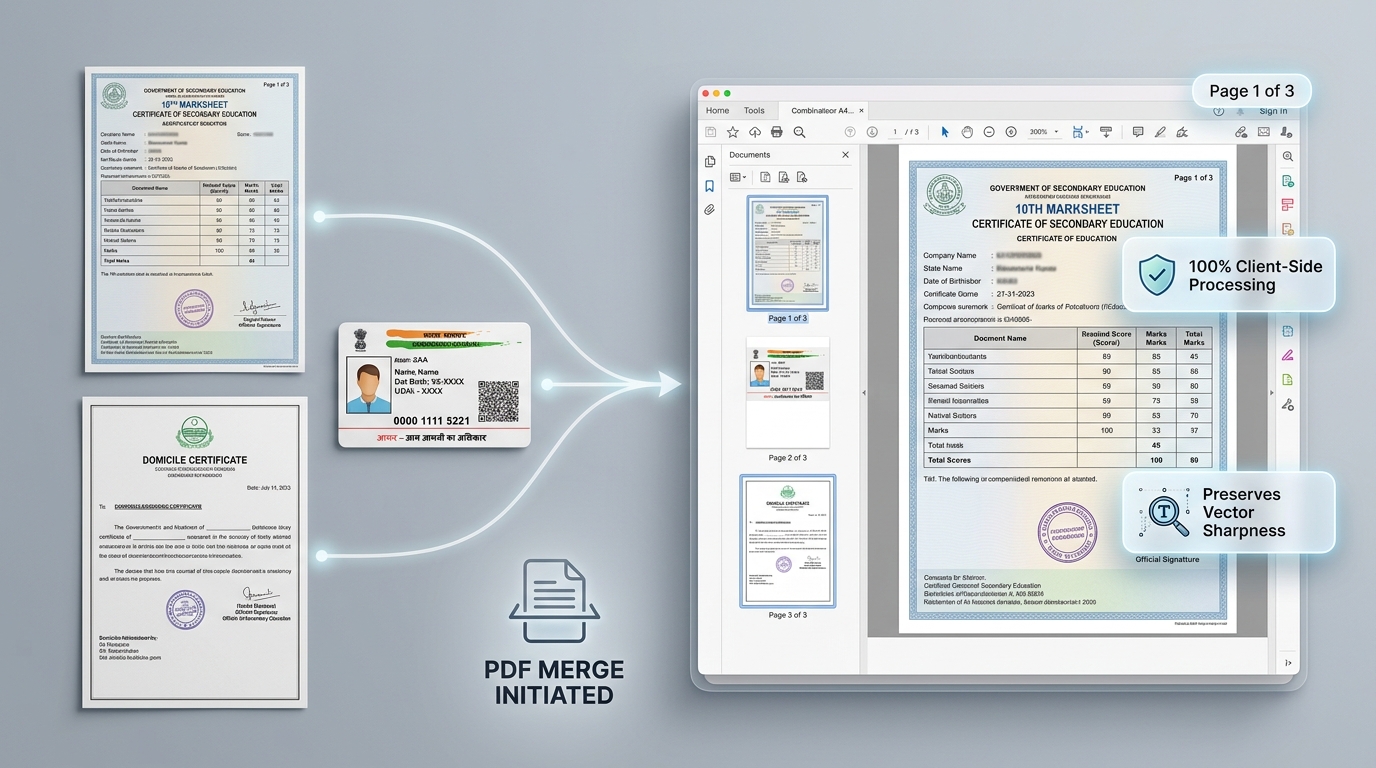
Multi-Document PDF Merge Visual Guide

Combine Multiple Marksheets, Scans & Photos into a Single High-Resolution PDF

Most competitive exam portals (SSC, UPSC, REET, Police) and scholarship applications require all supporting documents to be submitted as a single unified PDF file. Our tool merges multiple files in your exact preferred sequence with zero compression degradation.

Visual Guide to Merging Multiple Certificates and IDs into a Single PDF Document
Multi-Format Merge PDF + JPG + PNG Seamless Mixed Input
Page Reordering Drag & Drop Control Custom Visual Sequence
Vector Clarity Lossless PDF-Lib Digital Seals & Signatures Intact

⚡ 4 Easy Steps to Merge PDFs and Images:

1

Select & Upload Files

Drag and drop your PDF documents, marksheets, or images (JPG/PNG) directly into the upload dropzone.

2

Reorder Pages Visually

Drag cards to arrange your files in the exact sequence requested (e.g. 10th marksheet first, then caste certificate, then Aadhaar).

3

In-Page Live Preview

Click 'Preview' to verify the continuous multi-page document layout and page flow inside the modal without leaving the page.

4

Download Merged PDF

Click 'Merge & Download' to generate a unified, high-resolution PDF file processed 100% privately on your device.

Government & Academic Portal Combined PDF Upload Guidelines:

Portal / Application Type Mandatory Combined Documents Recommended Page Order Target File Size Limit
SSC & UPSC Recruitment All Semester Marksheets + Degree Certificate Chronological (1st Sem to Final Sem, then Degree) Max 500 KB – 1 MB
e-Mitra Domicile / Caste Services Application Form + Affidavit + Ration Card + ID Proof Application Form (P1), Affidavit (P2), Supporting Proofs Max 200 KB
State Post-Matric Scholarship Fee Receipt + Bonafide + Income Certificate + Passbook College Fee Receipt (P1), Income Proof (P2), Bank Details Max 1 MB
RERA & Legal Property Submissions Sale Deed + Registry + Mutation (Jamabandi) Copies Title Deed, Registry Endorsement, Latest Jamabandi Copy Max 5 MB – 10 MB

Frequently Asked Questions (FAQs)

1. How can I change the page order of files before merging?

Simply drag and drop any uploaded document card in the preview grid to reorder pages. You can arrange certificates, marksheets, and identity proofs in the exact sequence requested by the portal.

2. Can I merge both PDF files and JPG/PNG images together?

Yes. Our tool seamlessly accepts both multi-page PDF documents and standalone image files (JPG, PNG, WebP), stitching them together into a unified, high-resolution PDF document.

3. Does merging degrade the clarity of digital signatures or text?

No. The merging engine uses lossless vector stitching via PDF-Lib. All original fonts, vector line work, and official digital signatures retain 100% of their native resolution.

4. Is there a limit on how many files or pages I can combine?

There is no server-imposed limit. Because all processing executes locally in your device's browser memory, you can easily merge dozens of pages without queuing or throttling.

5. Are my confidential documents uploaded to any remote server?

Never. eMitraTool operates strictly client-side. Your marksheets, bank passbooks, and identity records never leave your device.

Notification