Done
Back

AI Document Scanner Gemini Vision

Smart OCR • Reconstruct Tables • Export .DOCX

Upload Photo / Document

JPG, PNG, WEBP

Click or Drag & Drop Photo

Marksheet, Form, Book Page, Affidavit • Ctrl+V

AI Extraction Modes

Smart Document
Image Sharpening & Rotate: Auto-Sharpen
Contrast Boost (अक्षर डार्क करें): 140%

AI Reconstructed Document Preview

0 Words • 0 Chars Ready
Quick Clean:
Document Canvas:

Upload photo on the left or press Ctrl+V to paste

AI Reconstructed Text & Tables:
AI Vision & Table Reconstruction

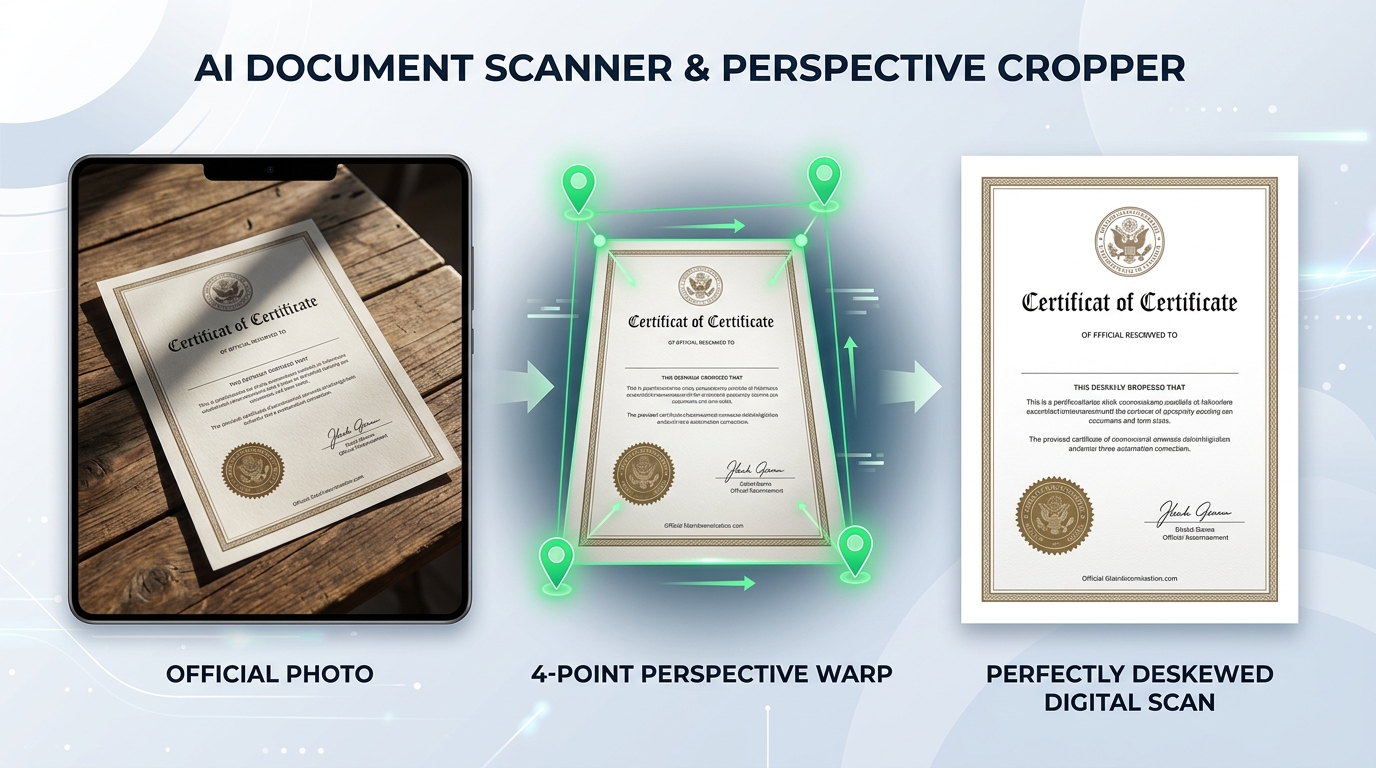
Transform Phone Photos into Official Digital Scans

Automatically detect document corners, straighten tilted camera angles, erase harsh shadows, and extract complex marksheets into editable Microsoft Word (.docx) tables.

4-Point Perspective Warp Word (.docx) Export
AI Document Scanner showing skewed phone photo, 4-point perspective crop, and flat A4 scan
Perspective Correction: Angled table snapshot deskewed into a pure white A4 digital copy A4 Ready

Why Mobile Photos of Certificates Cause Delays

Submitting mobile camera snapshots of 10th/12th marksheets, caste certificates, or land records often leads to verification rejection. Angled perspectives, fingers holding the paper, low lighting, and heavy shadow gradients prevent portal verifiers and OCR bots from reading roll numbers and marks.

Smart 4-Point Boundary Detection

Pins corners accurately to crop out wooden desks, bedsheets, and background objects, creating a clean rectangular frame.

Tabular Marksheet Reconstruction

Detects grade grids, subjects, maximum marks, and obtained marks, formatting them into editable Word (.docx) tables.

Hindi & English Bilingual OCR

Transcribes official Hindi notary affidavits, Domicile (Mool Niwas) certificates, and English certificates with high precision.

Step-by-Step Guide

How to Scan & Digitize Documents in 4 Steps

Easily convert physical paperwork into professional digital documents directly in your browser.

1

Upload Photo

Take a photo with your mobile camera, drop the file, or paste from clipboard using Ctrl+V.

2

Adjust Corner Pins

Drag the 4 green corner handles to align with the paper edges. The tool automatically corrects perspective distortion.

3

Run AI OCR & Cleanup

Apply document lightening filters to whiten the background and click "AI Extract" to transcribe text and reconstruct tables.

4

Download Word or PDF

Export as an editable Microsoft Word (.docx) document, copy clean text, or download a flat high-resolution A4 PDF.

Scanner Processing Modes & Supported Document Types

Recommended modes for various educational, legal, and identity records.

Document Category Recommended Filter Mode AI Extraction Type Best Export Format
Academic Marksheets (10th/12th/Degree) Color Enhance & Shadow Equalizer Table Grid Reconstruction Microsoft Word (.docx)
Court Affidavits & Notary Deeds High-Contrast B&W Photocopy Bilingual Hindi/English Text OCR Clean Text (.txt) / Word
Identity Cards (Aadhaar / Voter / PAN) 300 DPI Fine Detail Preserver Key-Value Field Extractor High-Res A4 PDF
Old Receipts & Challan Slips Faded Ink Restoration Filter Numeric & Total Recognizer Printable PDF
Help & Support

Frequently Asked Questions

Common questions about AI document scanning and Word export.

Can this AI scanner convert skewed phone camera photos into flat A4 scans?

Yes. The tool features 4-point perspective warp and edge detection that straightens tilted documents taken from any angle, removes background shadows, and produces a clean, flat A4 digital scan.

Can I extract marksheet tables into Microsoft Word (.docx)?

Yes. Powered by advanced vision AI, the scanner detects rows, columns, and headers in complex academic marksheets and converts them into fully editable Microsoft Word (.docx) tables without losing alignment.

Does the OCR support Hindi and regional Indian languages?

Yes. The AI OCR engine natively recognizes Hindi (Devanagari script) alongside English, accurately transcribing government affidavits, certificates, and legal deeds.

Are my scanned certificates and personal marksheets private?

Yes. Image pre-processing and perspective adjustments occur locally in your browser. OCR queries are handled via direct secure encrypted connections without storing your files on any third-party server.